Create your own House, Dance, Techno, Drum & Bass tracks
Ever wanted to try making your own beats? Then you should know there are loads of excellent and accessible music editors out there. Samplisizer is one of them, and while it’s mainly aimed at newcomers to the music-making trade, it has enough qualities to keep you excited.
Samplisizer’s biggest asset is its samples library which features more than 3,500 loops and samples (drum, bass, chords, effects), divided in two drag-down menus. A third drag-down list acts as sub-category to refine your search. If you’ve chosen drum loops for example, you can select house, drum’n’bass or downbeat only.
Making a track is easy. Start off by selecting a drum beat and drag it onto the working field. Next select a bass line or chord loop. Add extra sounds at particular points of your track. Make sure you place each different sample on a different channel. This will make it easy to tell them all apart and will give you a good overview of the structure of the track. It helps to see where a sample is missing or if you’re offbeat. The key is to measure the beat and know when is the right time to introduce or end a sample.
When you’re happy with the construction of your track, you can play around with the sound volume and BPM settings of each sample to tweak your piece. Setting channel volume in Samplisizer is easy, just drag the small button on the left of each channel. To set BPM you need to click a button at the bottom right of the sample library. General volume is controlled by the big rotating disk at the bottom right of the interface. Maybe if all the sound settings were united in one part of the application it would make it easier for the user.
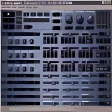
That’s when we come to the problems with Samplisizer. As you might have guessed from our previous observation, the application suffers from a cluttered and confusing interface. Buttons are scattered all around the program window and the interface is of the same gray metal-like appearance, making it hard to make out what buttons correspond to what function.
Editing tracks is fairly easy, thanks to the drag and drop, cut and paste feel, but there’s no way you can extend or reduce elements and you can’t even zoom in on them to get more precision. Samplisizer limits you to 12 channels, giving you much less scope than most music editors, which often offer up to 36 channels. Exporting is another issue. While the operation is very easy to do, click on the main menu button at the bottom left and choose export, you’ll soon realize you’re limited to the wav format. Mp3 would have been a much appreciated option.
Let’s not bash Samplisizer too hard though. Behind blatant shortcomings, which should put off seasoned beat makers, Samplisizer is an enjoyable and hands-on music editor that novice music makers should quickly take to their liking.

























User reviews about Samplisizer
by Anonymous
Not bad .
low funcuality and audio quality
suggested price $49 it is not economic for this software
there are same price and high in quality softwareFor example;dubturbo----> www.anlatbana.net16 channel
16 Tracks Of Stereo Boomin' Sound To Build Your Hot Beats With.
EASYILY Draw in or Trigger Sounds w/Keyboard shortcuts.
Draw In Bars & Edit With EASE! Change Sounds/Patterns Fast.
Drag & Copy Your Bars Around - Then Edit Them, Easy!
Jog Through 1000's Of Sounds & Drums With A Few Clicks~!
Record Live To The Metronome or Draw or Tap In Your Beats.
Edit Volumes, Go Solo, Mute, Save, edit Tempo + More!
Export Your 44.1 Studio Quality .wav Master - Industry Standard! Pros:
low funcuality and audio quality More